

robots.txt monitoring
Get an alert when robots.txt blocks your site
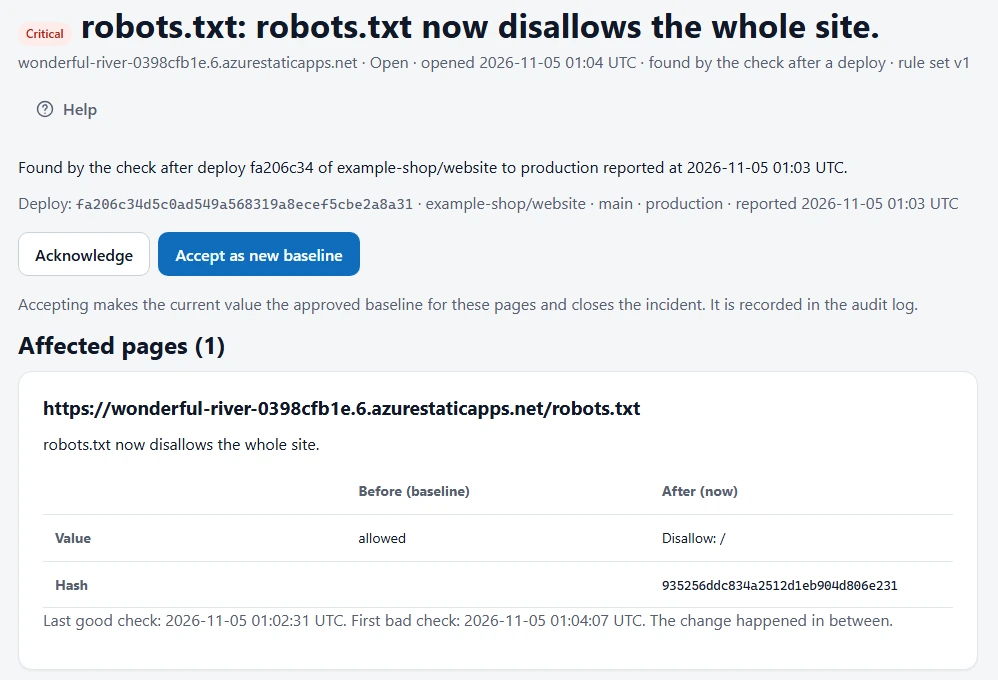
A staging robots.txt that reaches production can tell search engines to stay away from every page you have. SEO Change Guard checks for it and tells you, with the deploy that shipped it.

The problem
One line is enough: Disallow: /. The site still looks fine in a browser, so nobody on the team notices. The usual first sign is a report some days later, or a fall in search traffic.
What triggers an alert
- Critical:
robots.txtnow disallows the whole site. - Critical: it now disallows every one of your priority pages.
- Critical: it now answers with a server error.
- High: it now disallows one of your priority pages.
Other edits to the file don’t send an alert. If you add a rule for a folder you don’t care about, you won’t hear about it.
How you find out
Add the deploy hook to your release workflow and a check runs after each deploy. The alert then names the commit that shipped the change. Without the hook, robots.txt is checked hourly on paid plans and daily on Free, and a scheduled finding is re-checked at least 5 minutes later before anything is sent, so a brief error doesn’t wake anyone up.
When the file is fixed, you get a recovery notice and the incident closes.
Watch your robots.txt
The Free plan covers 1 site and 10 priority pages, with no card needed.
Frequently asked questions
Does it obey my robots.txt when it checks my site?
Yes. It follows the rules for its own user agent. If your rules block it, add an allow rule for it so it can run its checks.
What if we blocked a page on purpose?
Accept the change as your new baseline from the alert’s page. You must be signed in to do that; a link in an email can’t change your baseline.